
№ 006Account standing10 minTal Weiss
X rate limit exceeded: every posting and reading limit
What "rate limit exceeded" means on X, in the app and in the API: the published post, DM and follow caps, the per-endpoint API numbers, and what it costs.

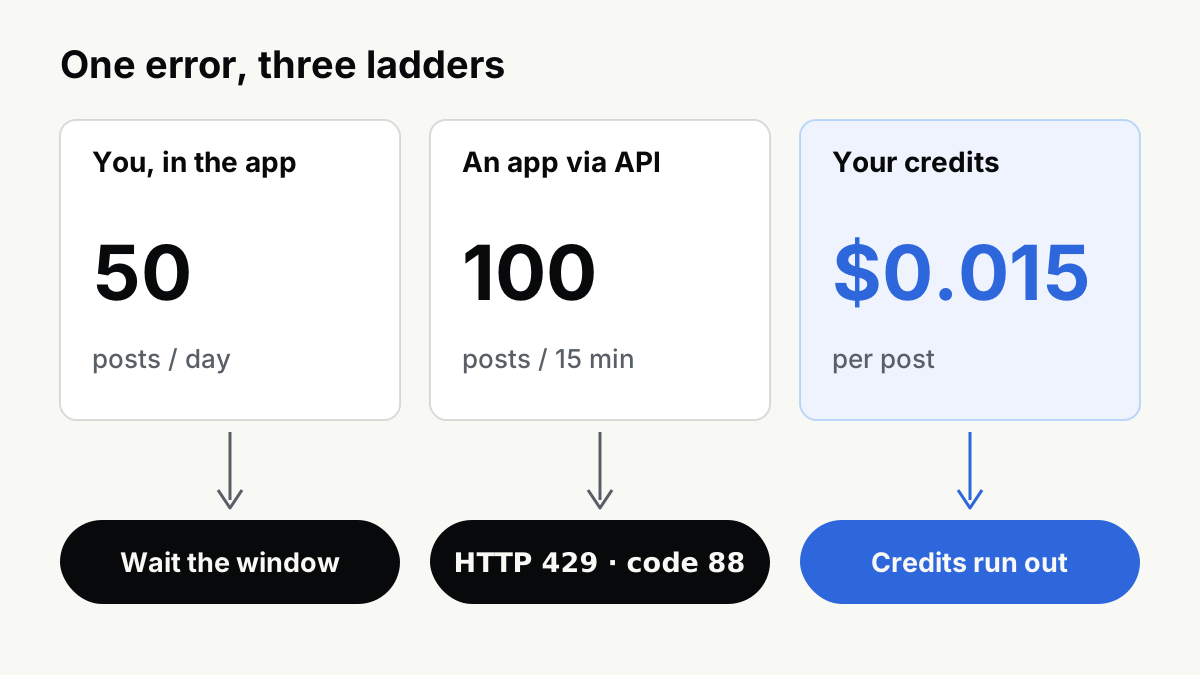
Short answer. "Rate limit exceeded" on X means a request was refused for being too frequent. It is not a ban, not a shadowban, and it leaves no mark on the account. There are three separate ladders behind that one phrase: the action caps that apply to you in the app (50 original posts and 200 replies a day for an unverified account, 500 DMs, 400 follows, per help.x.com, retrieved 2026-09-21), the per-endpoint API limits that apply to any app posting on your behalf (HTTP 429, error code 88), and your credit balance, because the X API has no free tier for new developers.
- 50 / day
- original posts, unverified account
- help.x.com, About X limits
- 100 / 15 min
- POST /2/tweets per user token
- docs.x.com, rate limits
- 13×
- API cost of a post with a URL
- docs.x.com, pricing
- 0
- published reading limits on help.x.com
- read 2026-09-21
Which of the three you actually have
Before the tables, work out which ladder you are on. People searching this phrase arrive from three different places:
- You saw it in the X app or on x.com. Almost always ladder 1: you tripped an action cap, or X is under load. Wait.
- You saw it in a third-party client, scheduler or embed. Ladder 2. Your account is fine; the app's budget ran out, or yours did inside that app.
- You are building something. Ladders 2 and 3 together, and ladder 3 is the one that will surprise you.
Reading limits
This is the part most people mean and the part with the least documentation.
In July 2023 X began refusing to show signed-in users more posts after a threshold, and the error read "Rate limit exceeded". The caps were announced on the platform and changed three times in a day; contemporaneous reporting has verified accounts at 8,000 posts a day, unverified at 800 and new unverified at 400, raised hours later to 10,000, 1,000 and 500 (TechCrunch, 2023-07-01; CNBC, 2023-07-04, both retrieved 2026-09-21). We label that as news coverage, not documentation, because that is what it is.
The important fact for 2026: those numbers were never written into X's help center, and no reading limit appears on it today. We read About X limits in full on 2026-09-21. It lists DMs, posts, email changes and follows. It says nothing about how many posts you may view. So if you are searching this phrase because scrolling stopped, we cannot give you a number, because X does not publish one, and neither can anybody else. What the page does say is the useful part:
These limits may be temporarily reduced during periods of heavy site usage. In such cases, we will post an update on the X status site.
We checked that escape hatch on 2026-09-21. status.x.com does not resolve at all, and X's Statuspage instance is inactive. So the page's own fallback, the thing it tells you to check when limits tighten, does not exist. That is worth knowing before you spend an afternoon deciding whether the problem is you.
There is a pleasing historical footnote here. The oldest article on X's own blog about this error, What does "rate limit exceeded" mean?, written by TweetDeck in 2008, is about reading too:
you have 100 API calls per hour in total regardless of which Twitter applications you use
Sending data to Twitter (posting), such as posting an update or a direct message, favoriting a tweet, unfollowing or following a user, does not count towards the limit
The phrase has meant "you read too much" for eighteen years, on and off. It has never primarily meant "you posted too much".
Posting and action limits, in the app
Verbatim from About X limits, retrieved 2026-09-21:
| Action | Published limit | Applies to | Source |
|---|---|---|---|
| Direct messages | 500 per day | all accounts | help.x.com, retrieved 2026-09-21 |
| Original posts | 50 per day | unverified accounts | help.x.com, retrieved 2026-09-21 |
| Replies | 200 per day | unverified accounts | help.x.com, retrieved 2026-09-21 |
| Changes to account email | 4 per hour | all accounts | help.x.com, retrieved 2026-09-21 |
| Follows | 400 per day | all accounts | help.x.com, retrieved 2026-09-21 |
| Follows after 5,000 following | "account-specific ratios" | all accounts | help.x.com, retrieved 2026-09-21 |
| Reading posts | not published | - | absent from the page |
Two honest notes on that table.
X's own page contradicts itself. The list above is under the heading "Current X limits". Three paragraphs later, under "What happens if I hit a limit?", the same page says: "The post limit of 2,400 updates per day is further broken down into semi-hourly intervals." 2,400 was the old combined figure. X updated the list and did not update the prose beneath it. We are quoting both because you will find both quoted elsewhere as fact, and neither side of that page has a date on it.
Premium is implied, not published. The post caps are qualified "for unverified accounts". X does not publish what the verified number is. Practitioners report it is substantially higher; we have no source for a figure and will not invent one.
One more line from that page matters more than any number if you use any tool at all:
These limits include actions from all devices, including web, mobile, phone, API, etc. API requests from all third-party applications are tracked against the hourly API limit. People who use multiple third-party applications with their account will therefore reach the API limit more quickly.
Your account has one budget. A scheduler, an analytics tool and a browser extension all spend from it.

API limits, per endpoint
These are the numbers that matter if you are building or scheduling. From X API rate limits, retrieved 2026-09-21. "Per app" is bearer-token, app-only auth; "per user" is an OAuth user token.
| Endpoint | Per app | Per user |
|---|---|---|
| POST /2/tweets | 10,000 / 24 h | 100 / 15 min |
| DELETE /2/tweets/:id | - | 50 / 15 min |
| GET /2/tweets | 3,500 / 15 min | 5,000 / 15 min |
| GET /2/tweets/search/recent | 450 / 15 min | 300 / 15 min |
| GET /2/users/:id/tweets | 10,000 / 15 min | 900 / 15 min |
| GET /2/users/me | - | 75 / 15 min |
| POST /2/users/:id/likes | - | 50 / 15 min, 1,000 / 24 h |
| POST /2/users/:id/following | - | 50 / 15 min |
| POST /2/dm_conversations/... | 1,440 / 24 h | 15 / 15 min, 1,440 / 24 h |
When you cross one, the response is exactly this:
{
  "errors": [{
    "code": 88,
    "message": "Rate limit exceeded"
  }]
}
with HTTP status 429, and three headers telling you where you stand: x-rate-limit-limit, x-rate-limit-remaining, and x-rate-limit-reset, which is the Unix timestamp when the window resets. A client that reads the third header does not need a retry heuristic. Most clients do not read it.
The third ladder: what the calls cost
Since the pricing change, the X API has no free tier for new developers. From X API pricing, retrieved 2026-09-21: "The X API uses pay-per-usage pricing with no subscriptions." You buy credits and they are deducted per request, and the same resource fetched twice inside a 24-hour UTC window is charged once.
| Operation | Unit cost |
|---|---|
| Post: read | $0.005 per resource |
| User: read | $0.010 per resource |
| Post: create | $0.015 per request |
| Post: create (with URL) | $0.200 per request |
| Owned reads (your own app's own data) | $0.001 per resource |
| Monthly post-read cap before Enterprise | 3,000,000 |
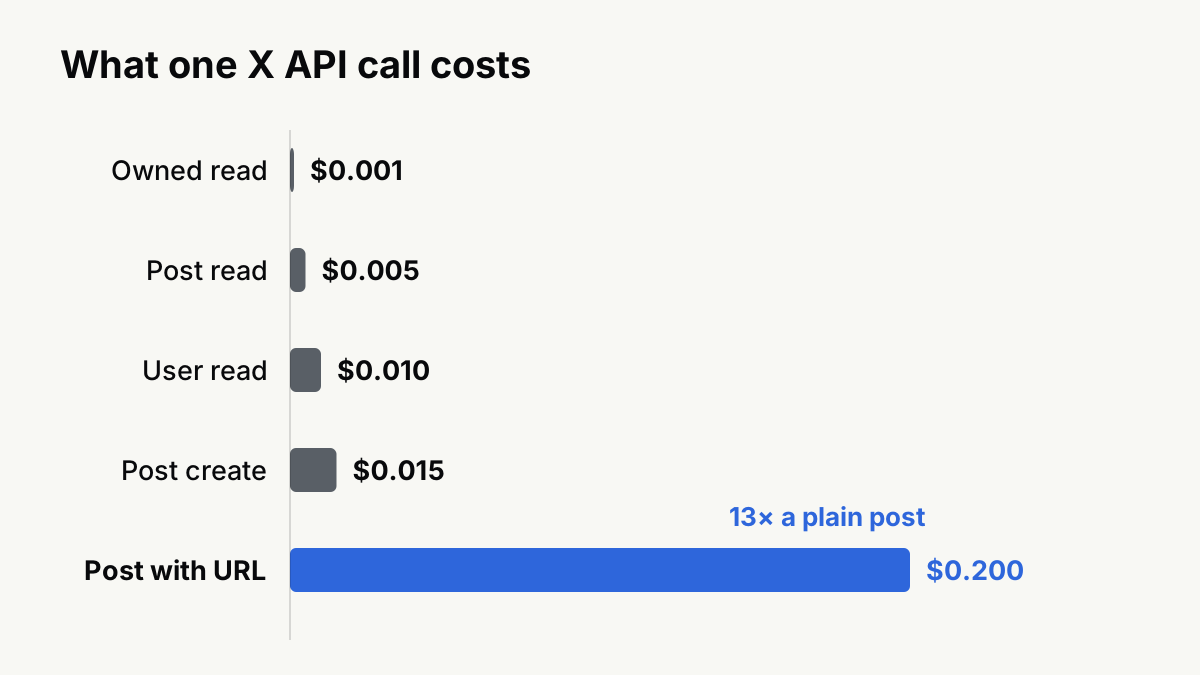
That fourth row is the one to sit with. Posting through the API with a link in the body costs thirteen times what the same post costs without one. X is pricing links, not just rate-limiting them. If you were looking for a reason to put the URL in a reply instead of the post, here is one that shows up on an invoice.
How a scheduler hits limits, and how a human does
They are genuinely different failures and the fix for one does nothing for the other.
A human hits a per-account, per-day ceiling on a kind of action: DMs, follows, posts. The ceiling is generous enough that normal use never touches it, and reaching it usually means something automated is running on the account, or you spent an evening replying. Nothing is recorded. You wait.
A scheduler hits a per-endpoint, per-window ceiling on requests, usually while reading rather than while posting. This is the counter-intuitive part: publishing 20 posts a day is nowhere near 100 per 15 minutes, but polling metrics for 200 posts every 10 minutes blows through GET budgets immediately. The limit our own engine was shaped by is a read limit, and not even X's: during development, reading eleven metrics for a dozen posts exhausted a full day of LinkedIn's analytics quota in one sweep, so we read five. Publishing has never been the constraint.
The trap in between: because account-level caps count API actions too, an aggressive tool can spend your personal daily follow or DM budget without you doing anything. If you are running automation on an account you also use by hand, assume one shared purse.
If you have one real account
- Getting rate-limited is not an enforcement action and does not affect distribution. If your reach fell and you are here looking for the cause, this is the wrong page: start with what is a shadowban, or with X's open-source algorithm and reach for what the published code actually does.
- If x.com itself is refusing to load posts, it is site-wide far more often than it is you, and there is no working status page to confirm it on. Try again later rather than changing anything about your behaviour.
- The published post cap is 50 originals a day. Nothing about good posting goes near it. Reach on X is not volume-limited by the cap; it is limited by the ranker attenuating your second and third post to the same reader in one session.
If you run many accounts
You will meet the API limits rather than the app ones, and the binding constraint is money, not throttling. Pay-per-use plus the 3M monthly read ceiling means a read-heavy operation across many accounts has a bill that scales linearly and a hard stop at Enterprise pricing. The per-account action caps are per account, so they do not aggregate against you, but the app-level budgets do: 10,000 posts per 24 hours per app is a shared purse across every account your app touches.
Two things we will say plainly, because most pages on this query will not. Running many accounts through one app is not a rate-limit problem to be engineered around; it is a terms question, and the rate limits are simply where you notice. And no proxy or client change moves any number on this page: these are per-account and per-app budgets, not per-IP ones.
What to do this week
- If you are a person who saw the error: nothing. Wait out the window.
- If you run a tool: log
x-rate-limit-remainingon every response and alert at 10 percent, instead of discovering 429s from a failed publish. - If you are costing a build: price the read path first, not the write path. Reads are where the volume is, and the $0.20 link surcharge is where the surprise is.
- If you post links: move them to a reply. It is cheaper on X, and on most other platforms it is better for distribution too.
For what every other platform publishes, and what it does not, we keep a dated cross-platform table at posts per day limits by platform. We run a publishing engine across nine of them, so we re-check these numbers because our own scheduler breaks when they move.
Questions
- What does "rate limit exceeded" mean on X?
- That some request of yours was refused for being too frequent, not that your account is in trouble. In the app it means you passed one of the published action caps and have to wait out the window. Through the API it is literally HTTP 429 with error code 88.
- How many posts per day can you send on X?
- X's help center publishes 50 original posts and 200 replies per day for unverified accounts, and says the daily total is further split into half-hourly slices. The same page still quotes an older 2,400 updates per day figure lower down, which X has not reconciled (retrieved 2026-09-21).
- Is there still a limit on how many posts you can read on X?
- Nothing published. The July 2023 view caps were announced on the platform and covered widely in the press, but they were never written into X's help center, and the current "About X limits" page lists no reading limit at all.
- How long does an X rate limit last?
- In the app, until the window rolls over, which for the post cap means hours rather than days. On the API, the exact second is in the x-rate-limit-reset response header, which is a Unix timestamp.
- Does hitting a rate limit hurt your reach?
- No. A rate limit is a refused request, not a label on your account. Reach problems come from a separate classifier that decides whether a post is distributed at all, which is a different subject.