
№ 009Account standing10 minTal Weiss
Account restricted: what each platform's status screen says
Instagram, TikTok and Facebook each expose an account status screen. LinkedIn does not. The exact paths, the states they show, and what an appeal really does.
Short answer. Three of the four platforms put your account standing on a screen you can open yourself: Instagram's Account Status, TikTok's Account check, and Facebook's Page Status. LinkedIn has no such screen; it emails you and prompts you at the next sign-in. All four separate a restricted account from a suspended one in the same way, and it is the distinction the word shadowban blurs: the people who already follow you keep seeing your posts, and everyone else stops. Every path and quote below was pulled from the platform's own help centre on 2026-09-21.
- 90 days
- until a TikTok strike expires
- TikTok, Content violations and bans
- 180 days
- to appeal a suspended personal Facebook account
- Facebook Help, suspended or disabled
- 30 days
- Meta's top strike restriction, Facebook accounts only
- Meta Transparency, Restricting accounts
- 4
- reasons LinkedIn lists for restricting an account
- LinkedIn Help, Account restrictions
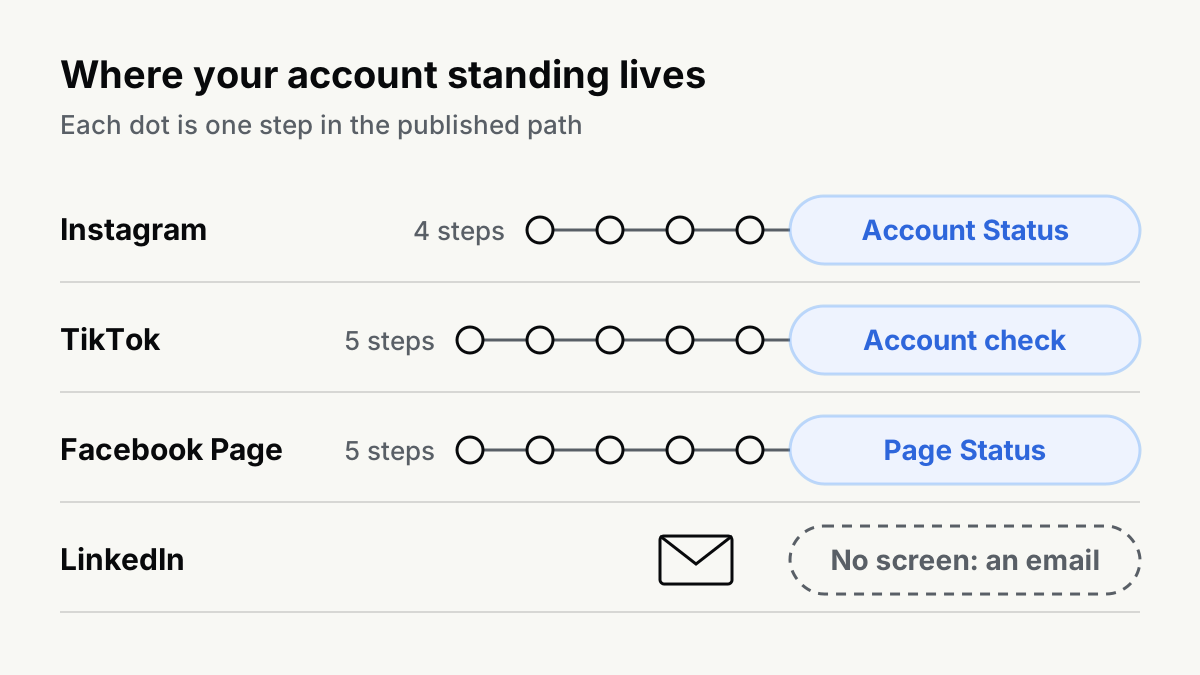
The four, side by side
| Platform | The screen | Path | Appeal | Published horizon |
|---|---|---|---|---|
| Account Status | Profile, Menu, More info and support, Account Status | Request a review; Disagree with decision | none for Instagram; the screen itself states the duration | |
| TikTok | Account check | Profile, Menu, TikTok Studio, More tools, Account check | Appeal on the notice, or in post Analytics | strikes expire 90 days after issue |
| Facebook Page | Page Status | Switch into the Page, Settings and privacy, Settings, Page setup, Page Status | See Details, then request review | 1, 3, 7 or 30 days by strike count, for Facebook accounts |
| none | an email, plus a prompt at next sign-in | View details in the restriction email | none published |
Instagram: Account Status, and the sentence that matters
Instagram's screen is the most complete of the four, and on a professional account it splits in two. Community Standards shows "any content that has been removed for violating these guidelines"; Recommendations Guidelines shows whether "your content or something on your profile may be impacting the eligibility of all your content to be recommended to people who don't follow you" (Check your Account Status on Instagram, retrieved 2026-09-21). A personal account sees three sections instead: Removed content, Features you can't use, Request a review.
The consequence is written out on a second page, and it is the clearest statement any platform makes about this state:
If your account is not eligible to be recommended, none of your content will be recommended regardless of whether or not all of your content goes against our Recommendations Guidelines. Note that these guidelines only apply to public accounts and recommendations to people who don't follow you. Even if you're not eligible to be recommended, your content can still show up for your followers.
(Recommendation eligibility on Instagram, retrieved 2026-09-21.)
Read that twice. It is account-level, not post-level: one flagged post can cost the whole account its reach to non-followers, and the rest of your posting is unaffected in every way you can see from the inside. Your follower reach holds. Your Explore and Reels reach goes to zero. That is why the symptom feels like a conspiracy and the cause is on a screen two taps away.
Appeals sit on the same screen: Request a review for a Community Standards removal, Disagree with decision for a recommendations decision, and an Edit or remove content button for the specific posts causing it.
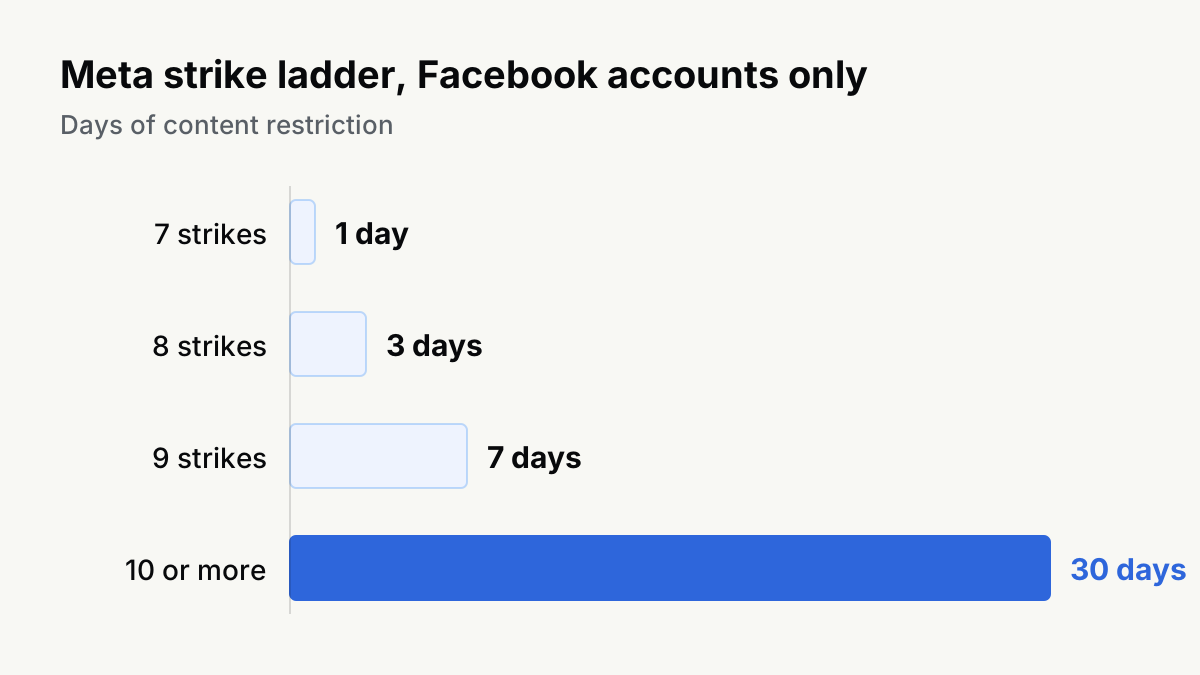
Duration is the one thing Instagram does not give you here. Meta's transparency centre publishes an exact ladder: one strike is a warning, two to six restrict specific features "for a limited amount of time", seven is a one-day content restriction, eight is three days, nine is seven days, ten or more is 30 days. But the same page adds the caveat that decides whether you can use it: "These restrictions generally only apply to Facebook accounts ... (Note that while we count strikes on both Facebook and Instagram, these restrictions only apply to Facebook accounts.)" (Restricting accounts, updated 2024-11-12, retrieved 2026-09-21). So the honest answer to "how long is my Instagram action block" is that Meta publishes no number for Instagram, and directs you to Account Status, where it says you can see "some restrictions your account might have and how long they'll last".
TikTok: Account check, and a second notice for reach
TikTok splits standing across two surfaces, which is why people miss half of it.
Account check is the feature-restriction screen. It reports five rows, each as a checkmark or a warning sign: "Login: Restricted from logging in. Posts: Restricted from posting. Comments: Restricted from commenting. Profile: Restricted from editing your profile. Direct messages: Restricted from sending messages" (Your account status, retrieved 2026-09-21). It lives under TikTok Studio, More tools, or under Settings and privacy, Support, Safety Center.
Reach is somewhere else entirely. If the account has lost recommendation, TikTok writes: "we'll notify you in your inbox notifications and profile to understand what content was flagged and why", and the appeal button sits on that notice (Why is my account not being recommended?, retrieved 2026-09-21). A per-post decision appears in a third place again, inside that post's Analytics. An account can pass Account check cleanly and still be invisible.
TikTok is the only one of the four that publishes an expiry: "Strikes on your TikTok account will expire after 90 days and will no longer be taken into consideration for a permanent account ban", with the sting attached, "Deleting your content does not remove strikes" (Content violations and bans, retrieved 2026-09-21). Account-level ineligibility has no published duration; TikTok says only that it "may automatically restore your account to good standing at any time".
Facebook Page: Page Status, and the row nobody expects
Page Status lists seven things, and the sixth is the one that catches brand accounts:
Recent Community Standards violations. Content shared by your Page that's been rated by third-party fact-checkers. Intellectual property rights violations. Content shared by your Page that's been identified as clickbait. Violations for sharing too much content from other sources. Events take-downs. Content shared by your Page that isn't eligible for suggestions.
(About Facebook Page Status, retrieved 2026-09-21.)
"Sharing too much content from other sources" is the originality rule with a Facebook name on it, and "not eligible for suggestions" is the non-recommendable state itself. The consequences are on the same page: "multiple violations may result in your Page being unpublished, having limits placed on it or other restrictions (example: no longer being able to create ads)", and repeat offenders "may have their distribution reduced, their ability to monetize and advertise removed, their ability to register as a news Page removed, and suspension of access to fundraising tools".
One caveat is printed there too, and it is rare enough to be worth quoting: "Page Status doesn't include all areas of Community Standards and Page policy violations. There may still be violations from your Page that Page Status doesn't reflect yet." A clean screen is not proof of a clean Page.
For a personal Facebook account the clock is different and it is published: "You can appeal the suspension within 180 days. If you don't appeal the suspension after 180 days or if your appeal isn't successful, we'll permanently disable your account" (My personal Facebook account is suspended or disabled, retrieved 2026-09-21).
LinkedIn: no screen, an email
LinkedIn publishes the taxonomy and not the dashboard. Its help centre lists four reasons an account gets restricted: content violations, profile violations, identity violations, automated tools violations (Account restrictions, retrieved 2026-09-21). There is no equivalent of Account Status to open. You find out by email and by an on-screen prompt the next time you log in.
What a feature restriction actually takes is spelled out, and it is narrower than people assume. Restricted: "Creating content, which includes posting, reposting, or editing past posts", commenting, and "Starting a new message conversation with connections of any degree". Untouched: viewing content, applying for jobs, replying to recruiters, continuing existing conversations, deleting your own posts. And one line that catches every founder who runs a company page: "Feature restrictions applied to your individual account will also apply to the same features on Pages you own or manage" (Feature restrictions - Content violations, retrieved 2026-09-21).
The appeal is not a form you fill in about the account. It is per decision: "To remove a content-related feature restriction, you'll need to successfully appeal the underlying content removal decisions that led to the restriction", starting from the View details link in each restriction email. If you violated more than one policy you appeal each one separately. The general restriction appeal lives at linkedin.com/help/linkedin/ask/ts-f-appeal.
LinkedIn publishes no horizon at all, and it publishes one asymmetry the others do not: "For certain egregious violations of our Professional Community Policies ... we may permanently restrict your account after a single violation" (How we enforce our Professional Community Policies, retrieved 2026-09-21).
Note the fourth reason on that list. Automated tools violations are a restriction category in their own right: LinkedIn writes that it does not allow "third-party software or browser extensions that scrape, modify the appearance of, or automate activity on LinkedIn's website", and that this "can result in temporary or permanent restriction of your account". If you are weighing an outreach tool, that sentence is the whole risk assessment.
Why X is not in the table
X publishes an enforcement-options page and a notices page, and on 2026-09-21 both returned 403 to us behind a bot check, from an ordinary browser and from a plain request. We do not quote pages we could not read. X also exposes no in-app standing screen equivalent to the three above. What it does expose, uniquely, is the rule set itself as open source, which we go through in what X's open-source algorithm says about your reach.
What does not help: starting again
Every platform here writes this rule down, in almost the same words.
TikTok: "If your account is restricted or banned, you may not create or use another account to get around it", and, in the bans article, permanent bans for anyone who will "Create or use another TikTok account to intentionally avoid restrictions or a permanent ban imposed on another account".
Meta: it may disable accounts "Created or repurposed to evade a previous account or entity removal, including those assessed to have common ownership and content as previously removed accounts or entities", and accounts "Owned by the same person or entity as an account that has been disabled" (Account Integrity, retrieved 2026-09-21).
LinkedIn: identity violations and automated activity are restriction reasons on their own, and restrictions follow you onto the Pages you manage.
There is a second reason a fresh account is the wrong move even when nobody catches it, and it has nothing to do with rules. A new account has no history for the ranker to use, which is the same condition that made the first account hard to grow. You trade a problem you can appeal for one you cannot.
Which reader you are
If you have one real brand account, everything in this note is a five-minute check and an appeal button. Open the screen, read the state, fix the specific posts it names, appeal, and keep publishing.
If you are running many accounts, most of this does not apply and the parts that do are the parts you would rather ignore: common ownership is an enumerated reason for Meta to disable an account, and cross-account evasion is an enumerated reason for TikTok to ban one permanently. The proxy and fingerprint advice that dominates search results for these phrases is written for that second reader, by the companies selling the proxies. We say so plainly because the first reader keeps buying it.
What to do this week
- Open all three screens today, before anything is wrong. Knowing what a clean Account Status looks like is the only way to recognise a dirty one.
- If a screen names specific posts, edit or remove those posts and appeal that decision. Blanket deleting does not clear a TikTok strike, and it does not restore Instagram recommendation eligibility on its own.
- On a Facebook Page, read the "too much content from other sources" row as the originality warning it is, and change what you publish rather than waiting it out. The same rule in three platforms' words is in reused content rules on YouTube, TikTok and Instagram.
- If reach fell with no notice anywhere, you are probably not restricted at all. What a shadowban is, and how to check on each platform covers what the checkers can and cannot see.
- Do not open a second account.
We run a publishing engine across nine of these platforms, so we read these screens every week rather than once. The pattern is dull and consistent: almost every drop that felt mysterious had a named state behind it, in an app, with an appeal button on it, and the account that recovered fastest was the one whose owner looked before guessing.
ShapelessAI is an agentic social media team: it researches your market, then writes, designs, and publishes posts and short video to nine platforms.
Questions
- How long does an Instagram action block last?
- Meta does not publish a duration for Instagram. Its transparency centre publishes a strike ladder with exact days, but states that those restrictions generally only apply to Facebook accounts even though strikes are counted on both Facebook and Instagram. For Instagram the only thing published is that Account Status shows the restrictions your account has and how long they will last, which means the screen in the app is the only place a number exists.
- How do I appeal a LinkedIn account restriction?
- Log in and follow the on-screen prompts: LinkedIn writes that if your account was restricted over content you believe complies with its policies, you can ask it to revisit the decision from inside the account. A feature restriction is different: to lift it you have to successfully appeal each underlying content removal, starting from the View details link in the restriction email.
- What does non-recommendable mean on a Facebook Page?
- It means the Page keeps working for the people who already follow it while Facebook stops surfacing it to new audiences. Page Status lists it as content shared by your Page that isn't eligible for suggestions, and Meta writes that Pages which repeatedly share false news or violate Community Standards may have their distribution reduced and their ability to monetise and advertise removed.
- Where is Facebook Account Status?
- For a Page it is Page Status: switch into the Page, then Settings and privacy, Settings, Page setup, Page Status. For a personal account, violations and their remaining duration appear in Account Status on Facebook and Instagram, which is also where Meta says you can see how long a restriction will last.
- Will making a new account fix a restriction?
- No, and every platform here writes the rule down. TikTok: if your account is restricted or banned, you may not create or use another account to get around it. Meta disables accounts created or repurposed to evade a previous removal. LinkedIn restricts accounts for automated tools and identity violations, and a feature restriction on your account applies to the Pages you manage too.