
ClaudeX
Connect Claude to your X
About a minute, three moves. Then Claude writes, designs, schedules and publishes your X posts, and you approve each one. Works in claude.ai, the desktop app, mobile and Cowork.
Or another network
Add Shapeless to Claude
In Claude, add Shapeless with the URL below. A Shapeless tab opens: sign in (or create an account) and allow. That is the whole install; nothing to download, no API key.
- 1
Open Settings, then Connectors (claude.ai/customize/connectors).
- 2
Press + and choose Add custom connector.
- 3NameName
ShapelessAI - 4Remote MCP server URLRemote MCP server URL
https://shapelessai.com/mcp - 5
Press Continue, then Connect. A Shapeless tab opens: sign in and allow the connection. Leave the OAuth client fields under Advanced empty - registration is automatic.
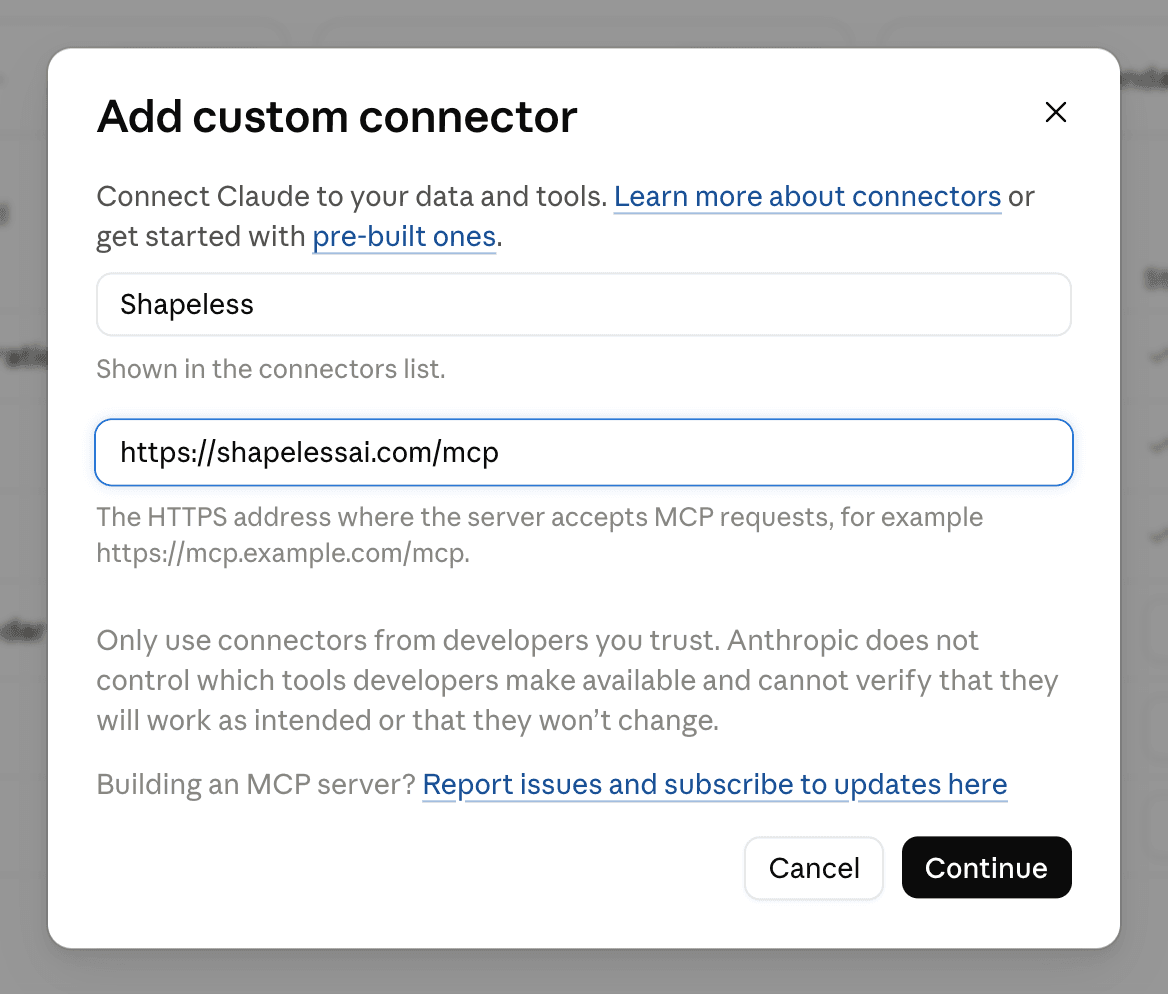
Steps read from Get started with custom connectors using remote MCP and Connector authentication on . Vendors move menus; if a step no longer matches, the source is the place to check and hello@shapelessai.com is where to tell us.
Connect X to Shapeless, once
In Shapeless, open Accounts and connect your X account through X's own sign-in. Shapeless keeps that connection; Claude never sees a password or token for it.
Ask Claude in plain words
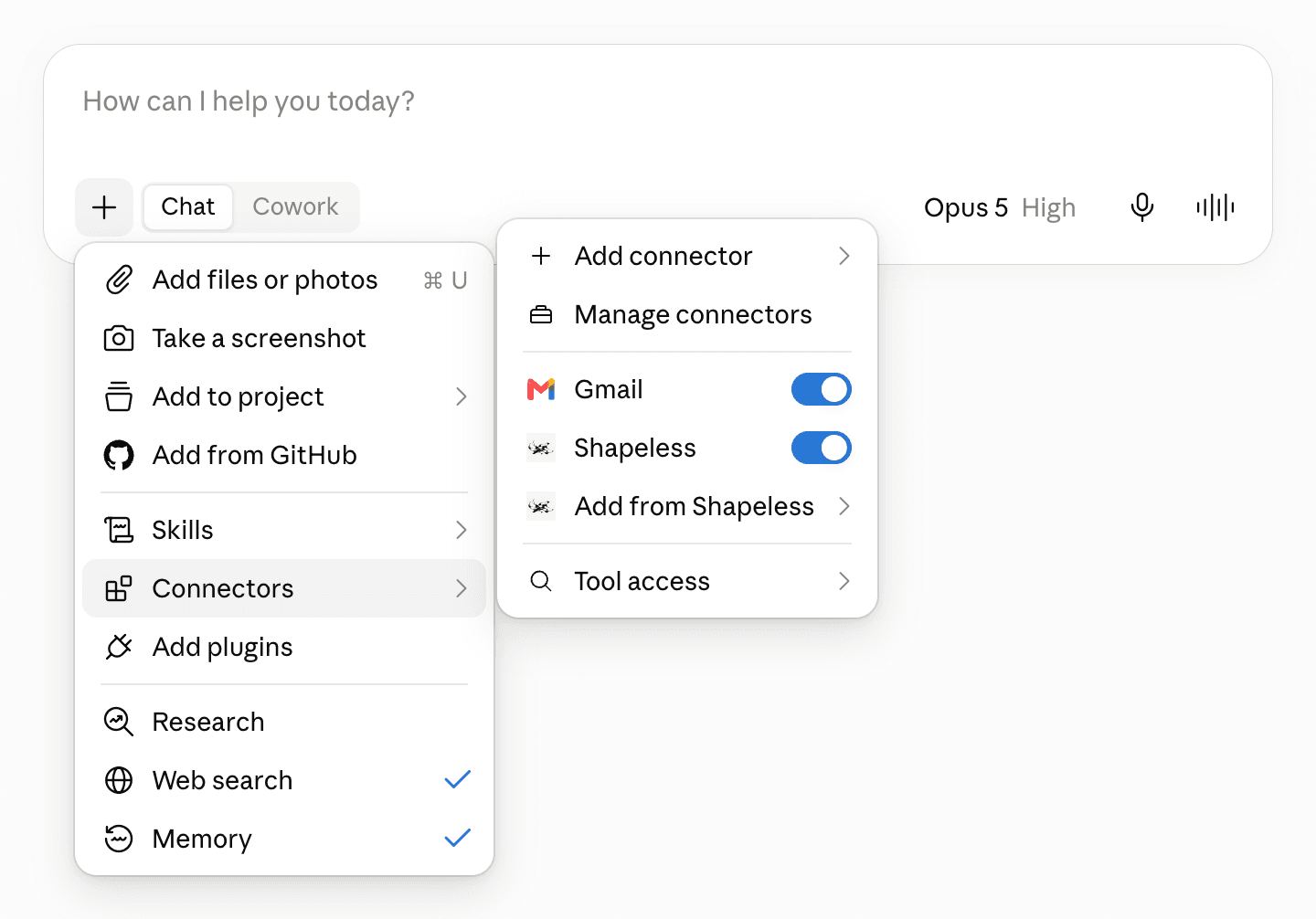
In a chat, open the + menu under the composer, choose Connectors and check that Shapeless is switched on. Then ask in plain words. Every draft lands in your Shapeless queue for approval unless you say otherwise, and you are asked before anything goes out.
Draft a thread on X about why we rebuilt onboarding, six posts, with the demo GIF on the first.Post this to X now: [paste]. Keep it under 280 characters and add the screenshot.Queue three X posts for the launch tomorrow: 8am, noon, 5pm.
X allows 280 characters per post and 4 images, 1 video up to 2 min 20 s, from X's own documentation as read on 2026-07-21. Shapeless enforces that table before a draft is queued. The full table is on the X spec page; check a draft yourself with the free X character counter.
Questions
- Which Claude plans can add Shapeless?
- Free (one custom connector), Pro, Max, Team and Enterprise. On Team and Enterprise an owner adds it under Organization settings and everyone connects their own account.
- Do I need a X developer app or API key?
- No. You connect your X account to Shapeless once, under Accounts, through X's own sign-in. Shapeless holds that connection; Claude never sees a X token, and you never paste a key into Claude either - it signs in to Shapeless with OAuth.
- Will Claude post to X without asking me?
- Not unless you set a standing agent to auto-publish. A job proposes drafts and waits for your approval in Shapeless or in the chat; the tools that approve, publish or spend are flagged, so Claude asks you before running one.
- Can it make the X media, not just the words?
- Yes - that is the point. We publish text, images and video here; PDF documents we do not deliver to X yet. X takes one video up to 2 min 20 s. You brief it in the chat; Shapeless designs the images or renders the narrated video with your actor and captions, and hands the draft back for approval.
- What does X allow in a post?
- 280 characters and 4 images, 1 video up to 2 min 20 s, per X's own documentation as we last read it on 2026-07-21. Shapeless enforces the same table its publishing engine does, so a draft that breaks a limit is fixed before it is queued.
- How do I disconnect it?
- Settings → API keys → Connected apps in Shapeless lists Claude with a Disconnect button; revoking there ends its access at once. Claude also lets you remove the connector on its side.
Also
For developers and agents: the MCP server, the tools, the CLI
https://shapelessai.com/mcpA remote MCP server over streamable HTTP. Sign-in is OAuth 2.1 with dynamic client registration and PKCE, so any host - Claude or your own agent - registers itself and opens a Shapeless tab to sign in and allow; the resource metadata is at /.well-known/oauth-protected-resource. Read tools run freely; anything that publishes, spends or overwrites is flagged destructive so the host asks first. The token is revocable under Settings → API keys → Connected apps.
| Tool | What it does | Runs |
|---|---|---|
| me | Who this credential belongs to: email, plan, credit balance. | reads |
| capabilities_list | Everything ShapelessAI can do, live or planned, with the REST routes, MCP tools and CLI lines for each and its page. A planned one says how to get the same outcome today and carries a want door; one with a route answers 501 there until it ships. Needs the read scope (over REST it needs no key). | reads |
| capabilities_want | Ask to be told the day a planned capability ships. Bound to this account's sign-in email; add an email or https webhookUrl to tell somewhere else. Ask the human first. | drafts |
| tools_list | The live catalog of the ShapelessAI studio agent's tools, each with its JSON Schema input and default price. Every one is also its own MCP tool here (generate_image, generate_footage, edit_footage, render_carousel, web_search, x_pulse and the rest); this is the read for what the deployment serves right now. | reads |
| connections_link | The one URL the human clicks to connect a social account on a platform (connections_list already carries one per missing platform). Lasts 15 minutes, works only signed in as this account; the platform's own OAuth follows in the browser, then the account shows in connections_list. | drafts |
| connections_list | Connected social accounts (identity only, no tokens), plus connect: one clickable link per platform with no live account, and reconnect on an expired one. Hand the link to the human. | reads |
| references_list | The creators, competitors and peers ("creators like me") this account works from, by set, each with its member id, platform, handle and profile url. Pass a member id to jobs_create as referenceId to make a post from that person. | reads |
| references_add | Add one person to the account's reference set: a handle and platform, or a profile URL, tagged creator, competitor or peer ("creators like me"). Pass suggestionId to accept a references_suggest suggestion. Adding someone already there answers the member with created: false. Picks stay private to the account. | drafts |
| references_remove | Remove a member from the reference set (memberId), or dismiss a suggestion (suggestionId). The reason (not_similar, not_relevant, low_quality, other) teaches the next suggestions. | drafts |
| references_suggest | People we suggest the account follow as references, best first, each with reasons [{code, evidence}] (same_niche, beats_baseline, co_selected, links_to_you, same_format...) to show the human. Accept with references_add {suggestionId}, dismiss with references_remove {suggestionId}. Empty with a note until the reference-suggest job has run for the account. | reads |
| references_browse | Search the reference graph: the account's own members matching q, how many other workspaces picked a matching handle (counts of at least k = 3, never who), and with platform plus an exact handle, what those workspaces picked beside it ("people who pick X also pick"). Counted per UTC day: Free 5, Spark 50, Growth 500, Studio unlimited; remaining says what is left, a 402 carries the upgrade links. | reads |
| jobs_create | Start a durable job from a goal, optionally with files attached. The run keeps going server-side; returns the job id and its web url to poll or continue. | drafts |
| jobs_list | List jobs with liveness and the web url of each, 200 per page, newest first. A non-null nextCursor means older jobs exist: pass it back as before. | reads |
| jobs_get | One job in full: transcript, running/idle status, outputs (posts with queue state, media) and its web url. Use jobs_brief when you only need enough to reply. | reads |
| jobs_brief | Compact context for continuing a conversation: the last messages clipped, an artifact inventory, post statuses, and the web url. Use jobs_get for the full transcript, jobs_continue to reply. | reads |
| jobs_tail | Watch a job's run: replays its events from the cursor, then follows live until the run ends, 60 seconds pass, or 200 events. Returns {live, cursor, events} - resume with that cursor. {live: false} means no run stream to attach to; the job may still have finished work, so read jobs_get. | reads |
| jobs_continue | Send another message to a job, optionally with files attached - also the way to resume a stuck or failed run with full history. | drafts |
| jobs_run | Press Run on the job's newest proposed plan - the approval click a headless caller has nobody to make. Use it after a turn ended with a plan waiting; deliverables still land as proposed drafts. | drafts |
| jobs_stop | Stop a running job. | asks you first |
| posts_list | The post queue: proposed drafts, scheduled posts, published history, newest first. For "my best posts": sort views ranks every published post by views (metrics.latest.impressions) across the whole history, narrowed by platform, connectionId, minViews and since. Each reading carries its fetchedAt; fresh re-reads the listed posts' numbers older than 6h from the platforms first (slower, up to ~30s). | reads |
| posts_get | One post's live state, with the url that opens it in the calendar for the human. | reads |
| posts_approve | PUBLISHES CONTENT: approving moves proposals to the schedule, and they will go out. | asks you first |
| posts_dismiss | Cancel posts: proposed, scheduled, failed or handed-off. Nothing already publishing or published is touched. Pass the user's reason when they gave one; it teaches the agent their taste. | asks you first |
| posts_publish | PUBLISHES CONTENT NOW: pushes a queued post to the platform immediately. | asks you first |
| posts_create | PUBLISHES CONTENT: puts a post you wrote on the rail for one connected account (connections_list), at a time, in the account's next free queue slot, or now. Read platforms_list first for the platform's limits and settings schema. Free plan: 10 posts a day (402 free_daily_cap says when the day resets). | asks you first |
| instagram_audio_search | Music or original sounds an Instagram account may attach to a Reel, from Meta's Audio API (audio Meta authorized for third-party use; the in-app catalogue can differ). Empty query = trending. Pass a result's id as posts_create audio.audioId; the sound is attached by Instagram, never burned into the video. Prefer isAdsEligible: true for a business promoting itself. Needs the Instagram account connected through Facebook Login; otherwise a 409 carries the connect link. | reads |
| platforms_list | Every platform the rail posts to: text limit, media rules, whether documentTitle is required, first-comment support, and the JSON Schema for its settings. Read it before posts_create. Works with any key (read scope or none). | reads |
| characters_list | The account's actors: who they are, what their voice is, and which parts are locked. voiceDescription is the casting direction a designed voice was written from - read it before designing another one, and reuse the actor that already fits. | reads |
| characters_voice | SPENDS CREDIT: gives an actor a voice. description designs one from casting direction (kept on the character, so later runs can reuse the actor); sampleMediaKey clones a real voice and requires consent: true - the user's own attestation that they hold the rights. Returns the voice id, a preview clip and what it cost. | asks you first |
| brain_onboarding | What is still open in Brand Memory, as the questions a human answers, with hints. Ask the human, write the answers as markdown under the question headings with brain_write at the item's path, then call again until open is empty. | reads |
| brain_tree | Brand Memory's file list with the completion ring. | reads |
| brain_read | Read one Brand Memory file. | reads |
| brain_write | Write one Brand Memory file (.md paths only) - the agent grounds future posts in it. | asks you first |
| assets_list | The media library: brand uploads and generated media. | reads |
| agents_list | The agent roster (the API calls them strategies). | reads |
| agents_save | Create an agent (no id) or edit one (with id). Setting autoPublishPosts arms publishing without human approval and needs the publish scope; everything else needs write. | asks you first |
| agents_wake | PUBLISH-SCOPED: wake an agent now; it plans and proposes (or with auto-publish, posts) immediately. Returns the conversation it woke into and its web url. | asks you first |
Studio tools: every tool our own agent uses, one call each. Images, AI video, video edits, carousels, speech, web and X research. Each takes the write scope; a priced one spends credit, so the host asks first.
| Tool | What it does | Runs |
|---|---|---|
| generate_image | Generate an image. About $0.016 a call. | asks you first |
| generate_footage | Generate AI video. About $0.18 a call. | asks you first |
| edit_footage | Edit a video. Free. | drafts |
| render_thumbnail | Render a video thumbnail. Free. | drafts |
| demo_page | Record a product demo. Free. | drafts |
| render_carousel | Render a carousel. About $0.02 a call. | asks you first |
| speak | Turn text into speech. About $0.03 a call. | asks you first |
| caption_file | Make a subtitle file. Free. | drafts |
| plan_music | Generate a music bed. About $0.06 a call. | asks you first |
| probe_media | Inspect a video or audio file. Free. | reads |
| find_photo | Find a real photo. Free. | drafts |
| find_footage | Find stock footage. Free. | drafts |
| find_face | Find a person's photo. About $0.007 a call. | drafts |
| brand_mark | Find a brand's logo. About $0.007 a call. | drafts |
| web_search | Search the web. About $0.015 a call. | asks you first |
| read_page | Read a web page. About $0.006 a call. | reads |
| screenshot_page | Screenshot a web page. Free. | drafts |
| record_page | Film a web page. Free. | drafts |
| capture_tweet | Capture a post from X. Free. | drafts |
| list_page_assets | List a page's images and videos. Free. | reads |
| inspect_page_style | Read a site's brand style. Free. | reads |
| fetch_asset | Import a file from a URL. Free. | drafts |
| x_pulse | Ask what X is saying. About $0.25 a call. | asks you first |
| news_search | Search the news. About $0.01 a call. | asks you first |
| concept_search | Search by meaning. About $0.007 a call. | reads |
| community_hot | What a community upvotes. Free. | reads |
| current_pulse | Measure talk on X. About $0.06 a call. | asks you first |
| related_trends | Find related trends. About $0.00001 a call. | reads |
| find_evidence | Find research evidence. About $0.001 a call. | reads |
| reference_search | Search posts that performed. About $0.00001 a call. | reads |
| reference_read | Read a post that performed. Free. | reads |
| linkedin_org_lookup | Find a LinkedIn company tag. Free. | reads |
The same account is driveable from a terminal or a script with a scoped API key: npx shapelessai --help, or the REST API documented in the public agent repo. Keys are minted under Settings → API keys.